For a small, untreated room, 5-inch studio monitors are the safest place to start, and the Yamaha HS5 and JBL 305P MkII are the two this guide puts first. A crowded desk or a hard $100 ceiling points to the PreSonus Eris 3.5 or the Edifier MR4, while a guitarist feeding an amp modeler into the speakers has a reason to step up to 6.5 inches with the Kali Audio LP-6 V2.
The reasoning is mostly physics. Small rooms exaggerate bass, so a bigger woofer can mislead you, and each pair below solves a different limit: desk width, wall distance, interface jacks or what you play through them. The findings draw on MusicRadar, SoundGuys, TechRadar and Sonarworks, measurement write-ups, maker spec sheets and owner reviews on retailer pages and forums. No speaker was powered on for this 2027 guide, so every remark about sound is credited to whoever heard it. Price ranges appear only where a source gave one; for the rest, check the current price on Amazon.com.
Room size, jack type and wall distance decided these six pairs
Room size comes first. MusicRadar’s best-of roundup says a 5-inch monitor suits an average home studio, 5 to 6 inches suit smaller rooms and 7 inches or more belong in bigger spaces, because large cabinets can overpower a small untreated room with bass. The same guide makes a claim worth weighing: a $300 pair in a treated room beats a $1,500 pair in an untreated one. That is the guide’s view, not a measurement, but it explains why the priced pairs below top out around $400.
Connections come second. MusicRadar’s connection guide says interfaces usually output balanced signals on 6.35mm TRS jacks, while monitors take TRS, XLR or both. Every pair here has at least one balanced input, yet the PreSonus Eris 3.5 and Edifier MR4 offer TRS without XLR, and the ADAM Audio T5V offers XLR without TRS. Which cable you buy depends on that detail.
Port position is third. MusicRadar’s notes say front-ported monitors tolerate walls better, and rear-ported ones need clearance to avoid boundary bass buildup. The Kali Audio LP-6 V2 is front-ported; the ADAM Audio T5V is not, and it pays for that in placement.
Studio monitors vs speakers: what changes when you start mixing
Hi-fi and desktop speakers are tuned to be enjoyed; monitors are tuned to be believed. Andertons, the UK music retailer, describes the monitor goal as a flat, uncoloured response that lets you judge what is in the recording rather than what the speaker adds, and says consumer speakers are built to be enjoyable and convenient, which can mean colouring the sound. The payoff is translation: a mix that sounds good on one pair of speakers can fall apart on headphones, in a car or on a home system.
Two more differences are mechanical. Most monitors are active, with amplifiers built in, and MusicRadar tells most buyers to choose active, keeping passive pairs, which need a separate amp, for high-end setups. Monitors are also meant to sit close, as nearfields, not across a living room.
One caution keeps this honest. In a 2002 comparison, Sound On Sound’s Phil Ward found no clear split in frequency response between hi-fi and “pro” speakers, and noted that a neutral tonal balance is not the same thing as a flat on-axis curve. A “monitor” label is not a measurement. Erin’s Audio Corner measured the JBL 305P MkII with a Klippel scanner and found a bumpy midbass and a peak near 1.6 to 1.8 kHz, and TechRadar reports that the Edifier MR4 has a Music mode that lifts the mid-highs slightly. Both count as monitors, and neither is perfectly flat. That is workable once you know what your pair does, which is why each entry below lists its quirks.
Headphones remain the usual cross-check. MusicRadar’s guide suggests them for low-end checks, since monitors in untreated rooms can mislead below the bass range.
Woofer size, jacks and room switches across the six pairs
Model
Woofer
Listed range
Inputs
Room switches
Price note
PreSonus Eris 3.5
3.5 in
80Hz to 20kHz
TRS, RCA, 3.5mm aux
Acoustic tuning controls
Under $100 per pair
Edifier MR4
4 in
60Hz to 20kHz
TRS, RCA, 3.5mm aux
Low and high EQ dials, Monitor and Music modes
Around $130 per pair
JBL 305P MkII
5 in
49Hz to 20kHz (±3 dB)
XLR, TRS
Boundary EQ, HF Trim
Check the current price on Amazon.com
Yamaha HS5
5 in
54Hz to 30kHz (-10 dB)
XLR, TRS
Room Control, High Trim
Check the current price on Amazon.com
Kali Audio LP-6 V2
6.5 in
39Hz to 25kHz
XLR, TRS, RCA
DIP-switch placement EQ
Around $400 per pair
ADAM Audio T5V
5 in
45Hz to 20kHz
XLR, RCA
High and low EQ
Around $350 per pair
The tolerance in brackets matters more than the bass number beside it. JBL’s page quotes 49 Hz at plus or minus 3 dB, while Yamaha’s spec listing quotes 54 Hz only at -10 dB and puts the -3 dB point at 74 Hz, so the two figures do not compare directly. Sonarworks’ measurements, covered in the Yamaha HS5 entry, show the practical result: the Yamaha gives up bass early.
Only the two smallest pairs take a 3.5mm aux cable, per SoundGuys and TechRadar, which makes them the only two you can plug straight into a laptop without an interface. Price notes come from the MusicRadar, SoundGuys and TechRadar pages named in each entry.
The best studio monitors for six rooms, from a $100 desk set to a ribbon-tweeter step up
SoundGuys calls the PreSonus Eris 3.5 “an amazing value for money” and names it the only model in its roundup priced below $100. It pairs a 3.5-inch Kevlar-composite woofer with a 1-inch silk-dome tweeter, lists 80Hz to 20kHz, and adds acoustic tuning controls and a headphone output.
Its limits show up at the low end, and the two main reviews describe them differently. MusicRadar’s budget guide says bass falls short, especially as volume rises, and notes that the amplifier sits in the left speaker (25W per speaker) with a cable feeding the right one. SoundGuys says the bass notes that do arrive are emphasized, which makes accurate mixing harder, and that the treble is under-emphasized, so strings lose clarity in busy passages. Both can be true at once: a small woofer can bump the upper bass and still run out of reach below it.
Owner reports add a durability angle. Equipboard’s roundup of forum and Reddit threads, written about the Bluetooth sibling that shares PreSonus’s manual with this model, says owners describe the second generation as lighter than the first, some report a lower maximum volume, and some report capacitor failures after about two years. It also mentions a thin vinyl finish that can peel, and ground hum when unbalanced inputs are used at the same time. That is an aggregator’s summary of scattered threads, so treat it as a pattern to watch, not a failure rate.
Pros:
The only pair here that SoundGuys and MusicRadar both place at under $100
TRS, RCA and 3.5mm aux inputs, so it works from a laptop
Cons:
No XLR input, and the bass is uneven according to two separate reviews
Owner threads summarized by Equipboard mention hum when two input types are connected together
PreSonus Eris 3.5See current price, sizes and reviews on Amazon.
2. Edifier MR4 — small-desk neutrality with two voicings
A 4-inch pair suits a desk where a 5-inch cabinet would crowd the keyboard. The Edifier MR4 pairs 4-inch woofers with 1-inch silk tweeters in MDF cabinets and lists 60Hz to 20kHz. SoundGuys scored it 8.8, called it neutral with decent bass for its size, and flagged a dip around 2 kHz that its EQ dials can correct. The price is around $130 a pair, per SoundGuys and TechRadar.
TechRadar’s reviewer liked the sound but found the low end somewhat lacking. The 60 Hz cutoff leaves little sub-bass, bass improves at higher volumes without reaching sub territory, and there is no sub output to make up the difference. The same review found an immersive image with the speakers about three feet apart, which suits a desk.
Pressing the power dial switches between Monitor mode (red LED) and Music mode (green), and Music slightly lifts the mid-highs. TechRadar calls the difference, and the EQ dials, subtle. Connections are analog only: balanced TRS, RCA, a 3.5mm aux on the front of the right speaker and a headphone output. There is no Bluetooth, optical or USB, which TechRadar flags for anyone who needs digital or wireless inputs.
Edifier MR4See current price, sizes and reviews on Amazon.
A listening position that moves around is where the JBL 305P MkII earns its place. JBL’s page lists a 5-inch woofer and 1-inch soft dome, 82 watts from two Class-D amps, 49Hz to 20kHz at plus or minus 3 dB, XLR and TRS inputs, a Boundary EQ low shelf (0, -1.5 or -3 dB at 50 Hz), a three-position HF Trim and 10.43 lb per speaker. JBL claims a wide sweet spot; Erin’s Audio Corner’s measurements back that up, with horizontal radiation of roughly 70 degrees either side out to about 13 kHz and a soundstage that extends past the speakers.
The same measurements list the trade-offs. Erin found the midbass resonant around 100 to 150 Hz, a 3 dB peak near 1.6 to 1.8 kHz, and output that appears limited between 96 and 102 dB at one meter (he assumes a DSP limiter and has not confirmed it with JBL). He recommends moderate volumes for nearfield use and warns that fixing these quirks with EQ could make other systems sound worse. MusicRadar agrees the speaker can flatter low-end mixes, and also dislikes the auto power-off and the glossy parts that collect dust.
Among the ten reviews on Thomann’s US page, hiss is the most frequent complaint: constant, audible in quiet rooms, and unaffected by the volume knob. Several reviewers suggest raising the interface output and lowering the speaker volume, and one says auto-standby removes the hiss only while the speakers idle. One review reports coil whine from the power supply and another reports cutting out on loud peaks, though those are single reports. The same reviews praise clarity and value. Check the current price on Amazon.com.
Pros:
Wide, deep soundstage in Erin’s Audio Corner’s dispersion measurements
Boundary EQ and HF Trim for desk or near-wall placement
Cons:
Constant hiss reported across several Thomann reviews
A measured peak near 1.6 to 1.8 kHz and a resonant midbass
JBL 305P MkIISee current price, sizes and reviews on Amazon.
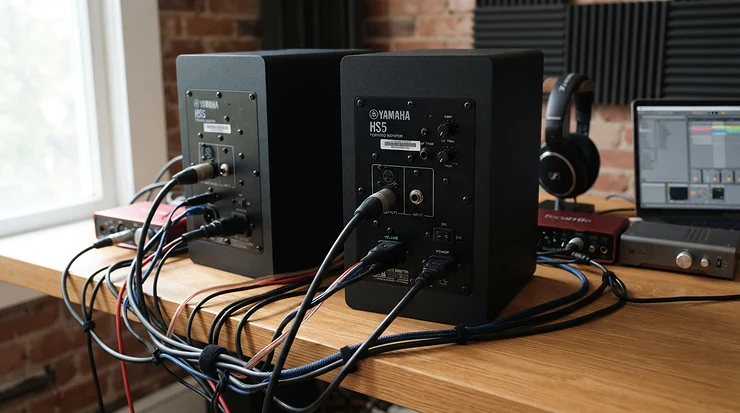
A compact room where truthful midrange matters more than low-end weight is the Yamaha HS5‘s natural home. MusicRadar calls it honest and non-flattering, praises its imaging and transient response, and lists a 5-inch woofer, 1-inch Kevlar tweeter and 70 watts, with the cons being no latching XLR and less low end than larger monitors. Yamaha’s spec listing gives 54Hz to 30kHz at -10 dB, a Room Control switch that trims bass below 500 Hz by 0, -2 or -4 dB, and a High Trim of plus or minus 2 dB.
Sonarworks measured the Yamaha HS5 in an anechoic chamber and in several real rooms. The bass rolls off early but shallowly, falling quickly from around 80 Hz, and the team read that as a deliberate tuning choice that keeps the sound neutral in untreated rooms. Distortion rises faster near 100 Hz, which Sonarworks names as the crossover point if you add a subwoofer. A 3 dB peak at 1 kHz persisted in some studios, the 45W amp could struggle at higher volume, and the team did not recommend the Yamaha HS5 for acoustically dead rooms.
Thomann’s US page shows 4.8 out of 5 across 842 ratings, and the common praise is clarity, flat response and compact size. The common complaint is the limited bass, which many of those reviewers fix with a subwoofer or a headphone check. One wanted more EQ bands, since the mids cannot be adjusted. Sonarworks’ verdict is the useful summary: strong value as a second set of monitors, a questionable only monitor without calibration.
Yamaha HS5See current price, sizes and reviews on Amazon.
Guitar players running a modeler or amp sim are the clearest fit for the Kali Audio LP-6 V2, which MusicRadar’s best-of list names its pick for guitar and amp modelling. The reviewer describes a transparent, characterless sound, DIP switches with diagrams for wall, stand or desktop placement, and comfort over long sessions. In the budget guide, Simon Fellows calls it quiet and accurate and scores it 4.5 out of 5, and the listed specs are a 6.5-inch paper woofer, 1-inch textile-dome tweeter, 80W Class D amplification, 39Hz to 25kHz, front porting and XLR, TRS and RCA inputs. That guide puts a pair at around $400.
A Line 6 forum thread from modeler owners gives the step-up logic. One reply recommends Kali’s 6.5-inch monitors as a step up from a 5-inch pair for about $100 more, while another user found 5-inch monitors underwhelming and preferred larger woofers. A third, working in a small untreated room, did not need deep bass, so the evidence on how much low end a guitarist wants is mixed. Confirm the exact version on the listing, since MusicRadar’s two pages call this model both Kali Audio LP-6 V2 and 2nd Wave.
Pros:
Front-ported, which MusicRadar says tolerates wall placement better
Characterless, quiet sound per two MusicRadar reviewers
Cons:
DIP switches that MusicRadar calls fiddly, and a plain look
Less bass extension than larger speakers
Kali Audio LP-6 V2See current price, sizes and reviews on Amazon.
6. ADAM Audio T5V — ribbon-tweeter detail that needs wall room
MusicRadar’s budget guide admits that at around $350 a pair, the ADAM Audio T5V stretches the word budget, then scores it 4.5 out of 5 and calls it worth saving for. It uses a 5-inch woofer and an accelerated-ribbon tweeter, lists 45Hz to 20kHz, and takes XLR and RCA inputs. MusicRadar’s best-of list files it under the best monitors for under $500 a pair, and praises a clear, precise top end with EQ adjustment and a compact footprint.
The compromises are about placement and the middle of the sound. The rear port needs 25 to 30 cm from the back wall, the low mids can sound obscured, the cabinet is deep enough to suit roomier setups, and there are no digital connections. MusicRadar’s best-of list also calls the rear power LED pointless.
Its own pages disagree on a couple of numbers: the best-of list gives 50W where the budget guide gives 70W, so read the maker’s spec sheet before relying on either. Check the current listings on Amazon.com for the pair that fits your room.
ADAM Audio T5VSee current price, sizes and reviews on Amazon.
Studio monitors under $100: what the budget really buys
Shoppers who search for studio monitors under 100 dollars find a thin field. SoundGuys’ roundup, last updated in November 2023, names the PreSonus Eris 3.5 as the only model it explicitly prices below $100, and mentions the Monoprice DT-3 at about $80 only to classify it as a computer speaker that needs EQ. MusicRadar’s budget guide also names the Eris as the only pair at that level. Because that SoundGuys page predates 2027, treat its price as a ceiling to check, not a promise.
The next step up, the Edifier MR4, lands just under $130 on SoundGuys and at $129.99 on TechRadar. That extra $30 or so buys balanced TRS inputs, a 60 Hz range and the two sound modes (my reading of the specs). SoundGuys scored the PreSonus Eris 3.5 9 and the Edifier MR4 8.8, which are close enough that desk space and cable type should decide between them.
What a $100 budget does not buy is trustworthy bass. Reviewers describe short or uneven low end for both small pairs, so use the headphone cross-check MusicRadar suggests before making final low-end decisions. Costs outside the price tag also add up: MusicRadar’s guide recommends stands or decoupling pads to stop desk resonance, and MusicRadar’s connection guide calls for two balanced cables once you step up to a pair with XLR or TRS inputs. A pair under $100 is a place to start hearing how mixes differ, not a reference for finishing one.
Studio monitors for guitar: what they can and can’t replace
Monitors reproduce whatever signal arrives, so the amp and cabinet have to be simulated before the signal reaches them. Andertons says that pairing a guitar with an amp-sim pedal, modeler or software lets monitors act as a detailed practice rig without turning up a full-size amp, and notes their lower noise floor suits quieter rooms. MusicRadar’s guidance adds that you can use a single monitor for amp modelling, where a mix pair would need two.
Real-use reports show where the idea stops. In a Line 6 forum thread, modeler owners agreed that monitors reproduce a modeler’s tone more faithfully than a guitar amp’s colored speaker, but warned not to expect the feel of a cranked stack. They also said 8-inch monitors can sound boomy in a small room at higher levels, and recommended a 12-inch FRFR speaker for rehearsal or small gigs. One commenter added that for playing presets, as opposed to mixing, price, power and reliability can matter more than a flat curve.
Size follows pitch. A standard-tuned low E sits near 82 Hz and a drop-C string near 65 Hz (standard pitch figures), while the Yamaha HS5 is listed at 74 Hz at -3 dB, so low-tuned players will meet its roll-off sooner than on a 6.5-inch pair like the Kali Audio LP-6 V2. For standard tuning at conversational volume, the JBL 305P MkII, which a Sweetwater representative suggested for a small room in that same thread, is a reasonable 5-inch choice if the hiss does not bother you.
Studio monitors: how to connect them without hum or pops
Connecting a pair takes about five minutes if the cables match the jacks.
Connect the interface to the computer by USB, USB-C or Thunderbolt and select it in your DAW’s audio preferences.
Turn the interface output to zero and the monitor volume down, with the monitors powered off, as MusicRadar’s guide advises.
Match the cable to the jacks. An interface with TRS outputs and monitors with TRS inputs takes two TRS-to-TRS cables, and XLR-only monitors need TRS-to-XLR cables. Kali’s support page gives the same rule: XLR out to XLR in, TRS out to TRS in, with combo cables for mixed jacks.
Wire left to left and right to right, then power the monitors on only after everything is connected.
Bring the monitor volume up to about halfway, then raise the interface output gradually, because a sudden rush of sound can cause pops or crackles.
Balanced cables earn their cost. Kali’s cable guide explains that a balanced connection carries the signal twice, once inverted, and recombines it at the destination so picked-up noise cancels out. Unbalanced RCA and 3.5mm connections work over short distances but are more prone to hum and interference. If a subwoofer joins the system, the same page puts it between the interface and the monitors.
Placement finishes the job. MusicRadar’s guide puts the tweeters at ear level, forms an equilateral triangle with your listening position, and keeps the monitors about 30 cm from walls and corners. If you plug two input types into the PreSonus Eris 3.5 at once, Equipboard’s summary of owner threads reports ground hum, so use one input at a time.
What studio monitors reviews and owner threads keep repeating
Several patterns repeat across the sources, and they matter more than any single score. Bass is the universal gap on 3.5- to 5-inch pairs: MusicRadar and SoundGuys on the PreSonus Eris 3.5, TechRadar on the Edifier MR4, and both Sonarworks and Thomann’s reviewers on the Yamaha HS5 all point to the low end, and several of the Thomann reviewers suggest a subwoofer or headphones. Noise is the second pattern, with the JBL 305P MkII hiss consistent across Thomann’s reviews and hum on the PreSonus Eris 3.5 appearing in owner threads.
Room fit comes third. The ADAM Audio T5V wants 25 to 30 cm behind it, the Yamaha HS5 has Room Control for near-wall use, and the Kali Audio LP-6 V2 is front-ported. Erin’s Audio Corner adds a purchase tip that applies to all six: buy from a retailer with a return policy and audition the speakers at home, because the character of a monitor changes with the room.
Star ratings are the weakest evidence here. A 4.8 out of 5 average, like the Yamaha’s on Thomann, measures satisfaction, not accuracy, and Sonarworks’ calibration findings show a well-reviewed monitor can still have a mid-band peak.
Subwoofers, wall distance and laptops: loose ends before you buy
Do I need two monitors or one?
Two for stereo mixing, according to MusicRadar's buying notes. A single monitor can suit amp modelling, where you are hearing one guitar signal rather than a stereo image, so check whether a listing covers one speaker or a pair before ordering.
Do I need a subwoofer with a 5-inch pair?
Not necessarily. MusicRadar generally advises against one unless your room is well treated and you know how it behaves. Sonarworks' measurements of a 5-inch Yamaha pair put the crossover near 100 Hz if serious bass monitoring matters, and headphones can cover low-end checks.
How far should studio monitors sit from the wall?
MusicRadar's connection guide says about 30 cm from walls and corners. ADAM's rear-ported 5-inch model needs 25 to 30 cm behind it, while front-ported designs such as Kali's 6.5-inch pair tolerate walls better, per the same roundup.
Are studio monitors under $100 good enough for mixing?
Good enough to learn on, not to finish on. SoundGuys scored the cheapest pair highly for value but says its emphasized bass makes accurate mixing difficult, so verify low-end decisions with headphones and reference tracks you know well.
Can I plug monitors straight into a laptop?
Only some. SoundGuys and TechRadar list 3.5mm aux inputs on PreSonus's 3.5-inch pair and Edifier's 4-inch pair, while the other four pairs expect an interface or an adapter cable. Kali notes that unbalanced connections are more prone to hum.
Which pair to buy for your room
Match the pair to the room before you match it to a review score. For a small, untreated room and an interface with balanced outputs, the Yamaha HS5 or JBL 305P MkII is where studio monitors make the most sense in 2027, with the Yamaha giving the plainer midrange and the JBL the wider sweet spot if you can live with its noise floor. A $100 budget or a crowded desk points to the PreSonus Eris 3.5 or Edifier MR4, with the understanding that bass decisions need a headphone check. Guitarists running a modeler should audition the Kali Audio LP-6 V2 first, and anyone with clear wall space and a bigger budget has a reason to hear the ADAM Audio T5V. Whatever you choose, buy from a store with a return window, set the tweeters at ear height, and check a mix on headphones before calling it finished. See the current listings on Amazon.com.
Disclaimer: This post contains affiliate links. As an Amazon Associate, I earn from qualifying purchases made through these links, at no additional cost to you.
Pick the pair your room can handle, then get back to the music.